
php function in navigation not rendering the desired html page

Hi,

Please bear with me, I do not regularly write php code and the site in question was not created by me!

The site is www.unwind-dc.com. I am attempting the edit the child under the acupuncture tab in the navigation. It was formerly called “acupuncture/nicole” but Nicole is no longer employed there. I first attempted to create a new page called “acupuncture/practitioners”, and edited the acupuncture.php and header.html files to replace Nicole functions and file extensions to direct to the new page. The navigation updated, but instead of rendering the new acupuncture/practitioners.html page it simply redirected to the home page.

In what I hoped would be a temporary fix, I then changed both the acupuncture.php and header.html files back to their original state with the exception of displaying the title as “practitioners” in the nav, and then edited the content of the “acupuncture/nicole.html” page to reflect the content my client currently desires there. No dice. It’s still redirecting to the home page.

Here’s my current acupuncture.php code (I think I’m using this tool correctly…):

[php]<?php

class Acupuncture extends Controller {

function __construct() {
    parent::__construct();
	$this->view->menu('3');
}

function index() {
    Header("Location: " . URL . "acupuncture/Nicole");
}


function nicole_mclaughlin(){
	$this->view->title('Acupuncture: Nicole McLaughlin');
	$this->view->render('acupuncture/Nicole');
}

}[/php]

Here’s what I tried to change it to:

[php]<?php

class Acupuncture extends Controller {

function __construct() {
    parent::__construct();
	$this->view->menu('3');
}

function index() {
    Header("Location: " . URL . "acupuncture/practitioners");
}


function practitioners(){
	$this->view->title('Acupuncture: Practitioners');
	$this->view->render('acupuncture/practitioners');
}

}[/php]

Here’s what my header currently includes for that section of the navigation:

<li class="<?= $this->page_menu == 3 ? 'active ' : '' ?> parent item470 sfHover"> <a href="javascript:;"><span>Acupuncture</span></a> <ul> <!--<li class="first-child item467"><a href="acupuncture/Nicole"><span>Nicole McLaughlin</span></a></li>--> <li class="last-child item469"><a href="acupuncture/Nicole"><span>Practitioners</span></a></li> </ul> </li>

and here’s what I attempted to change it to:

<li class="<?= $this->page_menu == 3 ? 'active ' : '' ?> parent item470 sfHover"> <a href="javascript:;"><span>Acupuncture</span></a> <ul> <!--<li class="first-child item467"><a href="acupuncture/practitioners"><span>Nicole McLaughlin</span></a></li>--> <li class="last-child item469"><a href="acupuncture/practitioners"><span>Practitioners</span></a></li> </ul> </li>

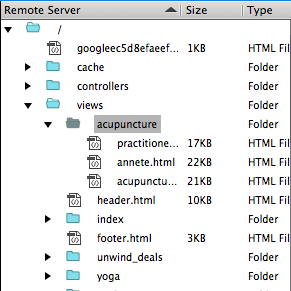
Both “Nicole.html” and “practitioners.html” are present in the Views/Acupuncture folder on my remote server, and both have the same content. Ideally, I want to direct to “practitioners.html” and also figure out how to add additional pages under Acupuncture in the future as they have a new employee to add in the next week or so.

Any help would be so greatly appreciated! ???
Well, one issue that may be the problem is your capitalization in your functions.

I noticed you mentioned “Views/Acupuncture” as the place you wanted it to go to, but, in your code, you do not
capitalize acupuncture. You need to make sure that the live folder in your server matches exactly the code.

Also, whatever pages were in the “nicole” folder would most likely be needed in the new folder for the render to
work. Once you are on the site, can you bring up the new folder when you go to it directly? Does it look as you
want it to be? Perhaps you are just not pointing directly to the correct file.

Not sure if this helps, but, something to think about to start with…

Hi, ErnieAlex, thanks for replying.

I believe acupuncture is lower case everywhere that it refers to a function or a file name, and only capitalized when dictating what text to display. (“Views/Acupuncture” in the description of my problem was a typo on my part, sorry. It should have read “views/acupuncture”.)

“nicole” is not a folder, just a single html page within the folder “views/acupuncture”.

When I enter the urls http://unwind-dc.com/acupuncture/practitioners or http://unwind-dc.com/acupuncture/practitioners manually or click them in the nav, the browser does stay at those URL’s, but renders the content from the index page. It does not redirect to the home page URL, as I previously thought.

Hope that helps…again, thanks.

One more update,

Nicole is very eager to be purged from the site for SEO reasons, so tomorrow I will be removing my failed patch (attempting to use her page and URL with updated content for now) and focusing on getting “views/acupuncture/practitioners.html” to display properly.

Sorry, was gone for a couple days… So, let’s explain the (“anchor”> tag in HTML… It is simple.
You have Javascript that uses: Header("Location: " . URL . “acupuncture/practitioners”); to change the page
to the default inside of the folder named “practitioners”. This means that it will attempt to take the index.html
or default.html file inside that folder. In the anchor, you send it to a folder, not a file in the same manner:
Practitioners
Therefore, if you want it to go to a non-default page, you have to hard code it in those two areas. You would
have to change the anchor to something like this:
Practitioners
This will tell the site to switch to a certain page instead of the default one inside that folder. The other option
would be to rename the file to index.html. Either way should work.

Hope this solves it for you…

Hi,

That sounds like it will work to force the site to render that page for now. I know the request will come soon to list multiple practitioners (child items) under the Acupuncture tab. I’m attaching a screen shot of the current files on the remote server. How would I get it to render each of those three files as child items, accessible as drop-downs in the nav under the Acupuncture tab?

Sorry if this question belonged in the beginner section! I really appreciate the help.


Screen Shot 2016-03-01 at 11.57.05 AM.png

Well, Miner, you must remember that an “anchor” has the “href” that points it to a page. Therefore, in your menu, you would have several different practitioners listed and each would just have a different location in their
“href” that would point to their own page. It should not be hard to alter your pages to handle that.

Did that make sense to you? Hope so…

It does make sense, I’m just confused because I didn’t alter anything about the the code or format except to substitute the word “practitioners” for “nicole”, so I’m not sure why it worked before, but not after my edits. Sub folders, .html endings and/or index pages were not included before.

Regardless, I will implement this step tomorrow and see how it goes. Thanks again.

Sounds good. Let us know how it goes.

Sponsor our Newsletter | Privacy Policy | Terms of Service