
Login Page using PHP and HTML

[font=comic sans ms]hell yeah comic sans[/font]

But seriously, how would I get this to work? I have little knowledge of PHP and HTML, but I can understand everything. Using my code, how would I get a login page to work?
register.html

[code]

Register your account


Register


Username:


Password:


Email:


Gender:

Male

Female

Canadian


Already have an account?

Index
[/code] register.php [php] * { font-family: "Comic Sans MS", Sans-serif; }

joo r beign haked


naim: <?php echo $_POST["username"]; ?>
possverd: <?php echo $_POST["password"]; ?>
jeemail: <?php echo $_POST["email"]; ?>
gendor: <?php echo $_POST["gender"]; ?>
</body>
<?php if(isset($_POST['username']) && isset($_POST['password']) && isset($_POST['email']) && isset($_POST['gender'])) { $data = $_POST['username'] . '|' . $_POST['password'] . '|' . $_POST['email'] . '|' . $_POST['gender'] . "\n"; $ret = file_put_contents('users.txt', $data, FILE_APPEND); if($ret === false) { die('i kant sayve ur perseonl inofmatin'); } else { echo "$ret lettraz stoln"; } } else { die('kill in rip'); } ?>


home[/php]
login.html

[code]

Login now!


Login


Username:

Password:


Don’t have an account?
Home
[/code] login.php is what I want to know how to make.
First of all it’s
not and secondly if your style your HTML with CSS you won’t have to use
in this case.

Here’s a quick HTML login form that I put together using some of your html.
[php]<?php
/* Get the current page */
$phpSelf = filter_input(INPUT_SERVER, ‘PHP_SELF’, FILTER_SANITIZE_URL);
$path_parts = pathinfo($phpSelf);
$basename = $path_parts[‘basename’]; // Use this variable for action=’’:
$pageName = ucfirst($path_parts[‘filename’]);
?>

Login Page * { box-sizing: border-box; -moz-box-sizing: border-box; -webkit-box-sizing: border-box; } form#login { display: block; width: 100%; max-width: 360px; height: 250px; background-color: whitesmoke; padding: 10px; margin: 10px auto; } form#login fieldset { text-transform: capitalize; padding: 20px; } form#login legend { font-size: 1.6rem; padding: 0 6px; } form#login label { float: left; display: block; width: 100%; max-width: 100px; height: 25px; font-family: Arial, Helvetica, sans-serif; font-size: 1.0rem; line-height: 25px; text-transform: capitalize; text-align: right; padding: 0 10px; } form#login input { outline: none; border: none; border-bottom: 1px dashed #000; clear: right; display: block; width: 100%; max-width: 180px; height: 25px; font-family: Arial, Helvetica, sans-serif; font-size: 1.0rem; padding: 0 5px; } form#login input[type=submit] { cursor: pointer; float: right; border: none; outline: none; width: 100%; max-width: 80px; height: 25px; font-size: 1.0rem; background-color: #2e2e2e; color: #fff; text-transform: capitalize; margin: 10px; } form#login input[type=submit]:hover { background-color: orange; } form#login p { font-family: "Comic Sans MS", Sans-serif; font-size: 1.2rem; } form#login p a { text-transform: capitalize; text-decoration: none; font-size: 1.4rem; font-weight: bold; color: magenta; } form#login p a:hover { color: purple; } Login Page Username: Password:

Do you want to register?

[/php]

Minimal PHP was done, but there is some nice tutorials here that Kevin Rubio and other’s have done -> http://www.phphelp.com/forum/the-occasional-tutorial/ that can help you get started. Once you do, I’m sure someone here will help you out if you get stuck.

<?php /* Get the current page */ $phpSelf = filter_input(INPUT_SERVER, 'PHP_SELF', FILTER_SANITIZE_URL); $path_parts = pathinfo($phpSelf); $basename = $path_parts['basename']; // Use this variable for action='': $pageName = ucfirst($path_parts['filename']); ?>

[member=57087]Strider64[/member], Can you tell me about this and why.

I know about that, it seems to be switchable. I don’t know why. And I don’t know much about CSS, so styling is not an option. I know so much about CSS that I might have switched and .

EDIT: I tried Copy+Pasting your code, and when I login using a existing account, it does this. localhost/<?php%20echo%20$basename;%20?>

Do I have to change $basename’s variable, if so, what to?

= XHtml

= HTML5

This brings to light several issues. You are trying to run a marathon before you know how to run a mile.

While login scripts are easy to implement, they do require understanding of the concepts. If you just want to pass data to another page, what you have works fine, but it is not a actual login feature.

Learn HTML and CSS. It is required if you are going to be doing both the front and back end development.

I agree with the comments so far except the
issues…

You really should use
for those.
will not make it past the W3C evaluation process. Once a site
is created, you need to validate it to make sure it is ready for the world.
will not make it thru. Same
as no ending slash in an tag or missing “ALT=” for images.

I realize I am opening an off-topic comment, but…

Also, on the form tag, I was researching on several security sites to make a client’s system more secure and
several of them stated very clearly that if a page posts to itself that you should always use action="".
(instead of showing the page itself.) I assume this is so a hacker can not see the page name when they
are scanning sites with robots. Confusing a little as a robot would already be on the page, so not sure why
that might be an issue… Hmmm?

Oh Ernie, Ernie, Ernie, the break tag
will indeed pass validation without the slash if you have the correct HTML5 doc type. Same thing for the image tag. I am surprised at you young man. * Admin, I think someone hacked Ernies account. :o

LOL Funny! Heee! So, Kevin, what doc type allows it? The three I have used do not pass them.
I will have to read up on that. Which do you use?

Other than what is in the container div, this is a template file I have. The
's is to show the validation.

[php]

API Test
	<div id='display' class='col-md-10'>
	<p>SOMETHING</p>
	<br><br><br>
	<p>SOMETHING ELSE</p>
	</div>


</div>
<script
	src='https://cdnjs.cloudflare.com/ajax/libs/moment.js/2.10.3/moment.min.js'></script>
<script
	src='https://maxcdn.bootstrapcdn.com/bootstrap/3.3.4/js/bootstrap.min.js'></script>


<script>

$(document).ready( function() {
$.get(‘api.php’, function( data ) {
$.each( data, function( key, val) {
$(’#display’).html( ‘

’ + key + ': ’ + val + ‘

’ );
});
});
});
[/php]
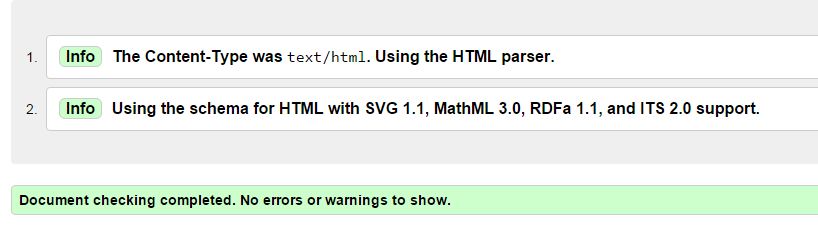
Document checking completed. No errors or warnings to show.
[url=https://validator.w3.org/nu/#textarea]https://validator.w3.org/nu/#textarea[/url]

Pop this into the validator

[code]

My Title I love break tags
and they validate
just like image tags in html 5 documents
![Nice Pic](upload://ns0TovezAkRazkupCgjkHqSCJUi.jpeg) [/code]

What? I mean, that’s a BLANK doctype. Is that now the preferred way to go?

Means html5

Not blank my brutha, that is pure html5. Not preferred. It is THE way for html5

Well, I have not played with any HTML5 specific coding as I have not needed any yet.
But, it is the way of the world, so will look into it further at some time. And, I will stop adding the slash…

If you really want to go into it, look into canvas.

Lots of new goodies added in HTML5. You will also want to get familiar with what has been removed.

Using HTML4/XHTML is like using mysql_*. It still works but for gawd sake stop using it. ;D

Oh, actually, I did help someone with a canvas routine once. Didn’t even look at the doctype! Doh!
It was a minor thingy not really a HTML5 issue, so didn’t notice the doctype!

Sponsor our Newsletter | Privacy Policy | Terms of Service