# Invoice design in HTML Table

**URL:** <https://www.phphelp.com/t/invoice-design-in-html-table/33410>\
**Category:** HTML & CSS\
**Created:** [April 27, 2021, 11:45am UTC](https://www.phphelp.com/t/invoice-design-in-html-table/33410 "2021-04-27T11:45:27Z")\
**Posts on this page:** 4\
**Page:** 1

<div class="post-metadata">

**Author:** ![devac9039](https://www.phphelp.com/user_avatar/www.phphelp.com/devac9039/32/3647_2.png) [@devac9039](https://www.phphelp.com/u/devac9039)\
**Post date:** [April 27, 2021, 11:45am UTC](https://www.phphelp.com/t/invoice-design-in-html-table/33410/1 "2021-04-27T11:45:27Z")

</div>

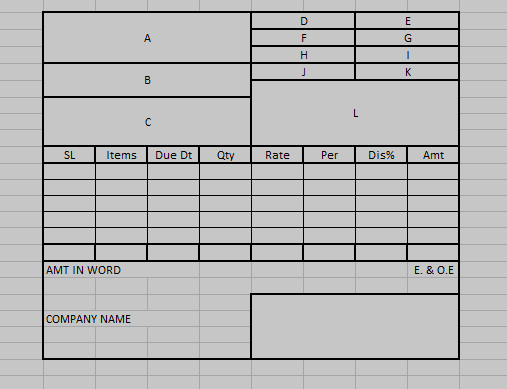
I am trying to create an invoice design in a simple HTML table.  
I tried my best but I unable to create that design in HTML.  
I am a beginner in HTML and even read all chapters in w3school. but I don’t know how I design this in HTML?  
I tried the below code but it not as expected. Please help me what would be the code for the html tab;e design as I attached the image, Please help me.

```
<table style="height: 90px; width: 100%; border-collapse: collapse; border-style: solid;" border="1">
  <tbody>
    <tr style="height: 18px;">
      <td style="width: 50%; height: 18px;">A</td>
      <td style="width: 25%; height: 18px;">&nbsp;</td>
      <td style="width: 25%; height: 18px;">&nbsp;</td>
    </tr>
    <tr style="height: 18px;">
      <td style="width: 50%; height: 18px;">&nbsp;</td>
      <td style="width: 25%; height: 18px;">&nbsp;</td>
      <td style="width: 25%; height: 18px;">&nbsp;</td>
    </tr>
    <tr style="height: 18px;">
      <td style="width: 50%; height: 18px;">&nbsp;</td>
      <td style="width: 25%; height: 18px;">&nbsp;</td>
      <td style="width: 25%; height: 18px;">&nbsp;</td>
    </tr>
    <tr style="height: 18px;">
      <td style="width: 50%; height: 18px;">&nbsp;</td>
      <td style="width: 25%; height: 18px;">&nbsp;</td>
      <td style="width: 25%; height: 18px;">&nbsp;</td>
    </tr>
    <tr style="height: 18px;">
      <td style="width: 50%; height: 18px;">&nbsp;</td>
      <td style="width: 25%; height: 18px;">&nbsp;</td>
      <td style="width: 25%; height: 18px;">&nbsp;</td>
    </tr>
  </tbody>
</table>
<table style="border-collapse: collapse; width: 100%; height: 36px;" border="1">
  <tbody>
    <tr style="height: 18px;">
      <td style="width: 12.5%; height: 18px;">&nbsp;</td>
      <td style="width: 12.5%; height: 18px;">&nbsp;</td>
      <td style="width: 12.5%; height: 18px;">&nbsp;</td>
      <td style="width: 12.5%; height: 18px;">&nbsp;</td>
      <td style="width: 12.5%; height: 18px;">&nbsp;</td>
      <td style="width: 12.5%; height: 18px;">&nbsp;</td>
      <td style="width: 12.5%; height: 18px;">&nbsp;</td>
      <td style="width: 12.5%; height: 18px;">&nbsp;</td>
    </tr>
    <tr style="height: 18px;">
      <td style="width: 12.5%; height: 18px;">&nbsp;</td>
      <td style="width: 12.5%; height: 18px;">&nbsp;</td>
      <td style="width: 12.5%; height: 18px;">&nbsp;</td>
      <td style="width: 12.5%; height: 18px;">&nbsp;</td>
      <td style="width: 12.5%; height: 18px;">&nbsp;</td>
      <td style="width: 12.5%; height: 18px;">&nbsp;</td>
      <td style="width: 12.5%; height: 18px;">&nbsp;</td>
      <td style="width: 12.5%; height: 18px;">&nbsp;</td>
    </tr>
    <tr>
      <td style="width: 12.5%;">&nbsp;</td>
      <td style="width: 12.5%;">&nbsp;</td>
      <td style="width: 12.5%;">&nbsp;</td>
      <td style="width: 12.5%;">&nbsp;</td>
      <td style="width: 12.5%;">&nbsp;</td>
      <td style="width: 12.5%;">&nbsp;</td>
      <td style="width: 12.5%;">&nbsp;</td>
      <td style="width: 12.5%;">&nbsp;</td>
    </tr>
  </tbody>
</table>
<table style="border-collapse: collapse; width: 100%;" border="1">
  <tbody>
    <tr>
      <td style="width: 100%;">&nbsp;</td>
    </tr>
  </tbody>
</table>

```

 ![table](https://www.phphelp.com/uploads/default/original/2X/8/871550a9f1b5f120153c0e1ab9fd4ba18ff56c4c.png)

---

<div class="post-metadata">

**Author:** ![ErnieAlex](https://www.phphelp.com/letter_avatar_proxy/v4/letter/e/bc8723/32.png) [@ErnieAlex](https://www.phphelp.com/u/ErnieAlex)\
**Post date:** [April 27, 2021, 2:13pm UTC](https://www.phphelp.com/t/invoice-design-in-html-table/33410/2 "2021-04-27T14:13:46Z")

</div>

Well, that is a loaded question… You can create a webpage and put the table inside it and that would make the page. But, if you wish to enter data for it, where is that data coming from? Have you created a database to hold the info? Are you wanting to create a webpage with inputs for the user to fill in the invoice data?  
To help you, we would need more information on what you want to do with this form…

---

<div class="post-metadata">

**Author:** ![skawid](https://www.phphelp.com/letter_avatar_proxy/v4/letter/s/bbe5ce/32.png) [@skawid](https://www.phphelp.com/u/skawid)\
**Post date:** [April 27, 2021, 3:22pm UTC](https://www.phphelp.com/t/invoice-design-in-html-table/33410/3 "2021-04-27T15:22:41Z")

</div>

HTML has better solutions to laying out content. The table containing the separate items would be a table, but the rest of this should be prepared using the newer CSS grid feature. Your desired result is also pretty complicated; if I were you I’d find a course that takes you through the basics of HTML and CSS and builds you up to a layout like this. There’s a few options [here](https://css-tricks.com/where-do-you-learn-html-css-in-2020/), one of them should help you get started.

---

<div class="post-metadata">

**Author:** ![ErnieAlex](https://www.phphelp.com/letter_avatar_proxy/v4/letter/e/bc8723/32.png) [@ErnieAlex](https://www.phphelp.com/u/ErnieAlex)\
**Post date:** [April 27, 2021, 3:30pm UTC](https://www.phphelp.com/t/invoice-design-in-html-table/33410/4 "2021-04-27T15:30:41Z")

</div>

If you just want an invoice and nothing else, here is a good example of one[:[Make an Editable/Printable HTML Invoice | CSS-Tricks](https://css-tricks.com/html-invoice/)]([https://css-tricks.com/html-invoice](https://css-tricks.com/html-invoice) It is from the site that Skawid posted. Thank him…